Quick photo-to-design tool for fast interior visual inspiration
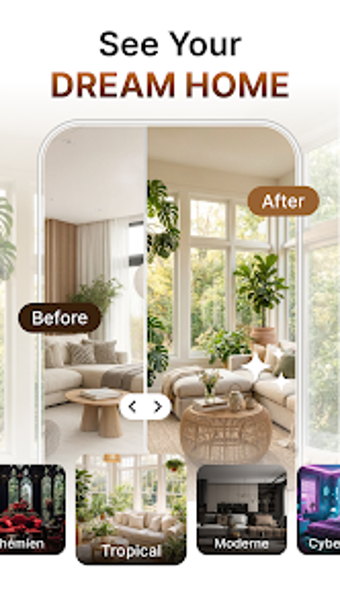
AI Home: Interior Planner, from Amobear Application - AILABS, simplifies home redesign by transforming smartphone photos into redesigned interior concepts. The app accepts room images and uses AI to produce style variations and instant visualizations, while offering a selection of common aesthetics and multi-room support. High-resolution output and an easy navigation model aim to help homeowners, DIY renovators, real estate professionals, and design students explore ideas without learning complex modeling tools.
How it fits into a quick redesign workflow
Designed for rapid iteration, the app structures a simple three-step routine: capture or upload a room photo, pick a style and room type, then receive generated images to review. Saved results can be exported to the device gallery or shared through messaging and social platforms, so users can assemble a visual mood board or send options to contractors and clients for early-stage decision making.
What devices and connections it needs
Built for Android phones, the tool runs on modern Android versions and relies on remote AI processing, so a stable internet connection is required to produce designs. The developer notes typical mobile requirements in store listings, and the app is optimized for on-device photo capture followed by server-side rendering, which keeps heavy computation off the handset during image generation.
How reliable the AI results are for planning
Useful for aesthetic exploration, the AI focuses on decorative changes like furniture, wall finishes, and flooring. User feedback highlights pleasing layout suggestions, though reviewers note the model does not always preserve exact structural dimensions, so generated images serve best as inspiration rather than final measurements for contractors.
How imagery and sharing are handled
Image workflow is straightforward: room photos are uploaded to trigger AI processing, and finished renders can be saved locally or shared directly. Because processing happens via networked AI, users should treat uploaded photos as data transmitted for generation, and plan follow-up checks if precise spatial accuracy or privacy controls are required.
A practical inspiration tool for exploratory design
The app is a practical option for homeowners and DIY renovators who want quick visual exploration before committing to renovation decisions. Expect the outputs to guide style choices rather than supply construction-ready plans, and verify measurements separately when moving from concept to build. As a creative starting point, the app suits anyone prioritizing fast idea generation over precision drafting.
Pros
Converts real-room photos into new design concepts instantly
Supports multiple room types and common decorative styles
Saves and shares generated images to gallery or social platforms
Cons
Not reliably accurate for structural measurements
Requires a stable internet connection for AI processing
Advanced usage and higher limits sit behind an account-gated tier
Laws concerning the use of this software vary from country to country. We do not encourage or condone the use of this program if it is in violation of these laws. Softonic may receive a referral fee if you click or buy any of the products featured here.